

New Features: Game Library
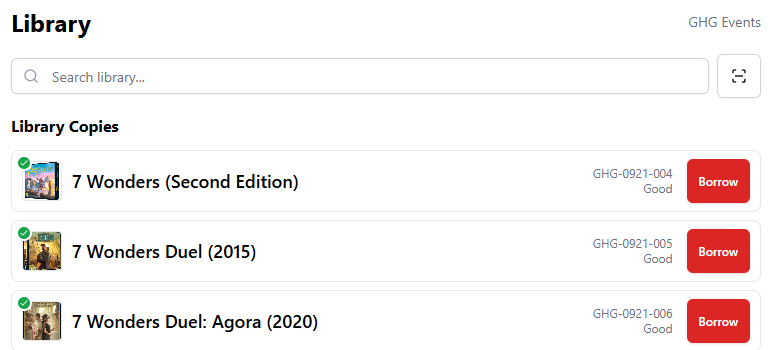
Screenshot of Library in App
Your community already uses Game Haven Guild to find your events, reserve your tables, and join your memberships. Now the same app is your lending library — so members can check out board games, take them home, and bring them back, all tracked automatically.
No spreadsheets. No index cards. No "who has my copy of Catan?" Just a catalog that lives inside the app your members already use.
How It Works
Flip on Library Enabled in your store settings, grant borrowing rights to the membership levels you choose, and your members get a dedicated Library tab. They browse your catalog, tap a copy, and it's checked out to them with an automatic due date based on their membership tier.
Bring it back, scan it in, and it's available again. Overdue copies are flagged for everyone — you and the borrower — so reminders stay effortless.
Built for Real Stores
Bulk upload your entire collection from a spreadsheet — the template's condition dropdowns keep every row clean.
Scan to find any copy by its barcode at the counter — no searching, no typos.
Per-tier loan periods — give your free members 7-day loans and your premium members 14, or however you want to tier it.
Real-time status — available, checked out, or reserved, updating live for you and your members.
It Reserves Games Like It Reserves Tables
Here's the part that changes how you run events. The same way you reserve tables for an event, you can now reserve library copies — so the game boxes your tournament or league needs are guaranteed to be on-site and not out on loan.
Pick the game in your Event Editor, and the copy picker shows only copies of that game that are free across the event's window. For recurring events, it holds the copy for every occurrence. When the event ends, the reservation releases automatically — no manual cleanup.
Matchmaking posts work the same way: a gamer reserving a copy for a match gets it held for that window and released when it's over. Same no-double-booking guarantee as your tables, applied to your game boxes.
Ready When You Are
Set up your catalog and membership levels first — nothing is visible to members until you flip the master switch. So you can build it out quietly, then go live when your shelves are ready.
The Game Library is available now in your dashboard under Library. Build your collection, turn it on, and turn your store into the place gamers come back to — not just to play, but to borrow.
Learn More Here: Game Library Guide — Game Haven Guild